Your account: an overview
Your account is storage plus settings: saved projects, the equipment catalog, the libraries, the links and everything that shapes how the editor behaves for you personally. It opens from the "Account" button in the top right of the editor.
Eight sections
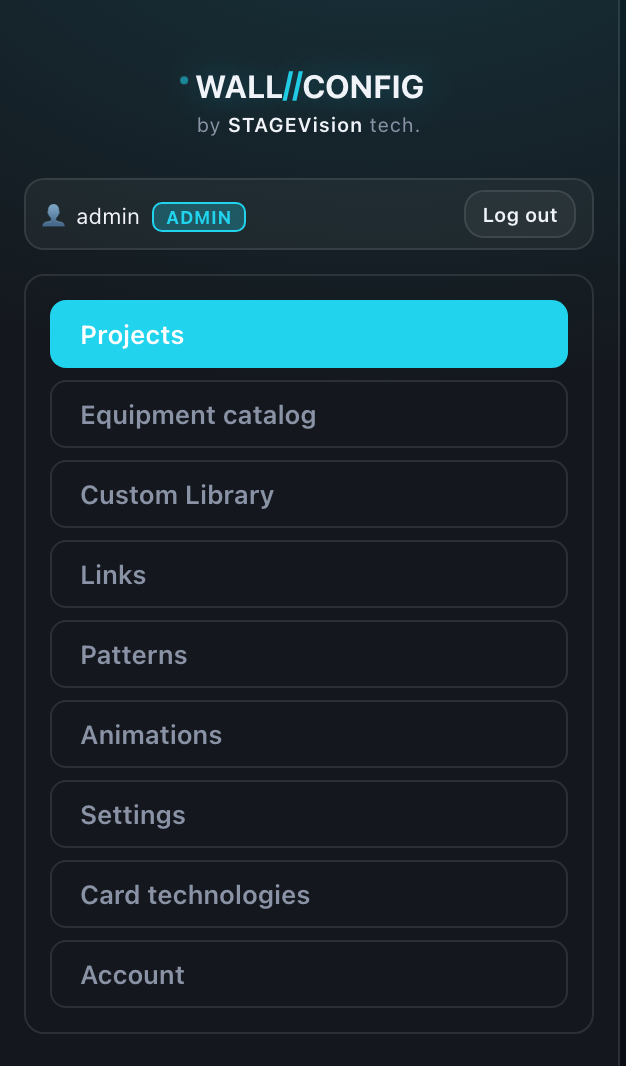
The sections are listed on the left. That list is also the order of the articles in this chapter:
| Section | What it covers |
|---|---|
| Projects | Everything saved: previews, opening, renaming, deleting |
| Equipment catalog | Your cabinet models and processing cards |
| Custom Library | Saved free-form screens |
| Links | Every public link across all projects at once |
| Patterns | Ready-made presets and your personal layer and label settings |
| Settings | Author profile, defaults, snapping and export settings |
| Standards | The limits overload is judged by: port capacity and the power line ceiling |
| Account | Login, email, password, language, sessions and limits |
One principle across every section
The sections all work the same way, so learning one teaches you the rest:
- in the centre — a list of cards: projects, models, links, presets;
- on the right — the panel for the selected item; it stays empty until you select something;
- clicking a card opens it on the right in view mode — the fields are visible but locked;
- "Edit" unlocks the fields and brings up "Save" and "Cancel".
"Save" stays disabled until you actually change something. That is not a fault: it means you cannot overwrite a record by merely looking at it.
Leaving edit mode with unsaved changes asks for confirmation. The exception is a blank creation form you never typed into: there is nothing to lose, so there is no question.
What a guest gets
The account is for registered users. A guest can use the editor in full, but cannot save projects, keep a catalog or create links: there would be nowhere to store them. More in "Accounts and guest access".
Which sections you see depends on your access: anything not open to you is not shown at all. An empty section is an empty section, not a missing one.